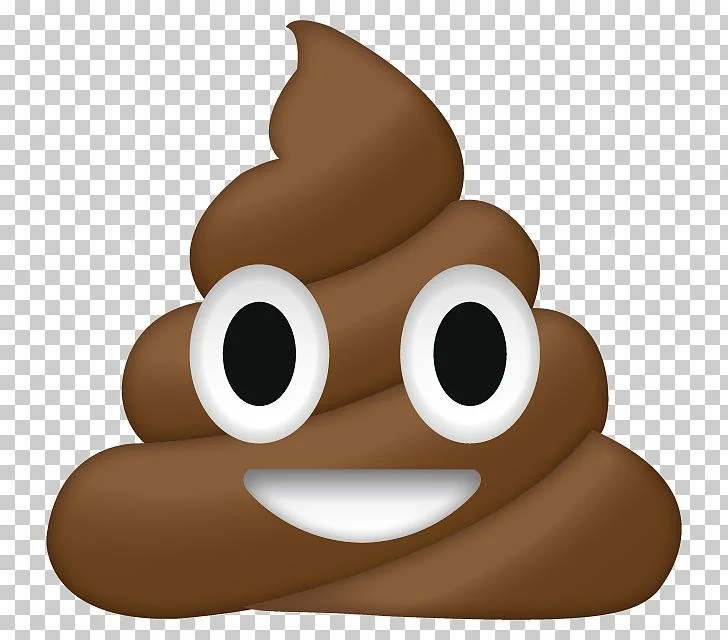
The poop emoji PNG (💩) is a popular cartoon-style emoji used in funny messages, memes, stickers, social media posts, and digital designs. A poop emoji PNG with a transparent background is especially useful because you can place it on photos, videos, presentations, or graphics without adding a white or colored box behind it. If you need a cute smiling poop emoji, a funny poop face, or a high-quality transparent image, choosing the right PNG makes your design easier and more attractive.
In this guide, you will learn what a poop emoji PNG is, where to find one, how to use transparent images, which styles are available, and how to choose the right image for your project in 2026.
Quick Answer: What Is a Poop Emoji PNG?
A poop emoji PNG is an image file featuring the familiar 💩 emoji, usually illustrated as a smiling, swirled pile of brown poop. PNG stands for Portable Network Graphics, an image format that supports transparency.
A transparent poop emoji PNG allows you to place the emoji on different backgrounds without an unwanted white rectangle.
Here are the main options to look for:
| Type | Best Use |
| 💩 Classic poop emoji PNG | Messages, memes, and everyday designs |
| 😀 Smiling poop PNG | Cute, playful graphics |
| 😂 Laughing poop PNG | Funny posts and reaction images |
| 🥰 Cute poop emoji PNG | Stickers and friendly illustrations |
| 💩 Transparent PNG | Logos, overlays, and creative projects |
| 📱 Small poop emoji PNG | Messaging graphics and icons |
| 🖼️ Large poop emoji PNG | Posters and high-resolution designs |
| 🎨 Cartoon poop PNG | Illustrations, crafts, and entertainment |
What Does the Poop Emoji Look Like?
💩
Classic Poop Emoji
Brown swirls and a friendly facial expression.
💩😂
Useful for jokes, humorous reactions, and memes.
💩✨
Cute Poop Emoji
A playful choice for colorful graphics and stickers.
💩🎨
Creative Poop Graphic
Suitable for illustrations, crafts, and custom artwork.
The familiar poop emoji is typically depicted as a soft-serve-shaped brown swirl with large eyes and a smile. However, its exact appearance can vary across platforms, including Apple, Google, Microsoft, and other emoji designs.
A PNG image can preserve a particular illustration, allowing you to use the same design in different projects instead of relying on how an emoji renders on each device.
What Is a Transparent Poop Emoji PNG?
A transparent PNG is an image that can contain transparent pixels. These pixels allow the background behind the image to remain visible.
For example, imagine placing a poop emoji on a blue Instagram story. A transparent image shows only the emoji, while a PNG with a solid white background displays a white rectangle around it.
Why Transparency Matters
Transparent poop emoji images are useful because they:
- Blend naturally into different colored backgrounds.
- Work well in stickers and digital collages.
- Make video overlays easier to create.
- Allow you to position the emoji over photos.
- Help maintain a clean appearance in presentations.
- Make custom memes and reaction graphics more flexible.
Important: A file ending in .png is not automatically transparent. Some PNG files contain a solid background. Check the image itself or test it on a colored background before using it.
Where Can You Find a Poop Emoji PNG?
Several online resources provide emoji references, downloadable images, or graphics that may be suitable for your project. Always check the usage terms before publishing or commercially using an image.

1. Emojipedia
A useful resource for understanding the standard 💩 emoji and comparing how different platforms display it.
Best for: Official emoji information and platform comparisons.

2. PNG image libraries
PNG-focused libraries may offer cartoon poop images in multiple sizes and styles. Check whether each file has a genuine transparent background.
Best for: Stickers, graphics, and design elements.

3. Freepik
A graphics platform with illustrations and clipart. Available downloads, attribution rules, and commercial-use permissions depend on the individual asset and license.
Best for: Decorative artwork and creative projects.
4. OpenClipart
A resource for clipart illustrations. Review the information provided for the specific image before using it.
Best for: Simple clipart and creative experiments.
These resources have different collections and licensing rules. The examples above are starting points, not a guarantee that a particular transparent poop emoji file is available for free or unrestricted use.
How to Download a Poop Emoji PNG
Downloading an image is usually straightforward, although the exact steps depend on the website and device you use.
On a Computer
- Open an image library or search for “poop emoji transparent PNG.”
- Select an image that matches your preferred style.
- Open the original image or its download page.
- Look for a download option and select an appropriate size.
- Save the file to your computer.
- Open the saved image to check its quality and transparency.
If the image opens in a browser rather than downloading, you may be able to right-click it and choose Save image as. Some websites disable direct image saving or require you to download the file through their own interface.
On an Android Phone
- Open your browser.
- Search for a poop emoji PNG with a transparent background.
- Select a suitable image from a source you trust.
- Tap the download option if one is available.
- Open your Downloads folder or gallery to locate the file.
If an image is saved as a WebP or JPEG instead of a PNG, it may not preserve transparency. Check the actual file format rather than relying only on the preview.
On an iPhone
- Open the image’s source page in Safari.
- Use the site’s download option if available.
- If supported, press and hold the image to access saving options.
- Check the Files app or Photos app for the saved image.
Some websites use previews that cannot be saved as the original file. In that case, use the site’s direct download feature.
How to Use a Poop Emoji PNG in Your Designs
A poop emoji PNG can add humor to a range of digital and creative projects.
1. WhatsApp Stickers
A transparent poop emoji image can be used as the basis for a custom sticker. Depending on your sticker-making app, you may need to crop the image, resize it, or export it in the required sticker format.
2. Instagram Posts and Stories
Place a poop emoji graphic on a colorful background or use it to add a humorous touch to a meme. A transparent image makes it easier to blend the emoji into your design.
3. YouTube Thumbnails
Creators sometimes use expressive cartoon graphics to make humorous thumbnails. Choose a large, clear image and avoid covering important text or faces.
4. TikTok Videos
A poop emoji PNG can work as a reaction overlay, a funny visual effect, or part of a comedic video. Make sure the image remains visible against the video background.
5. Presentations and School Projects
For a lighthearted presentation, a small cartoon emoji can add personality. However, it may not be suitable for formal, medical, or professional topics.
6. Memes and Digital Art
Combine the emoji with a short caption, speech bubble, or background. Make sure any added text is readable and the final design communicates the intended joke.
How to Choose a High-Quality Poop Emoji PNG
Not every image is suitable for every project. Before downloading, consider the following features.
| Feature | What to Look For | Why It Matters |
| Resolution | Enough pixels for your intended display size | Prevents blurry graphics |
| Transparency | A real transparent background | Avoids unwanted boxes |
| Image quality | Clean edges and clear facial details | Improves the final design |
| File format | PNG for supported transparency | Preserves transparent areas |
| Dimensions | Suitable width and height | Reduces unnecessary resizing |
| License | Clear permission for your intended use | Helps avoid copyright problems |
| Style | Matching colors and expression | Keeps your design consistent |
What Size Should You Choose?
The right size depends on the purpose.
- Small messaging graphics: A modest image may be sufficient.
- Social media posts: Choose a resolution suitable for your final canvas.
- Video overlays: Use an image large enough to remain sharp at the intended size.
- Posters or large designs: Look for a high-resolution source or a suitable vector graphic.
A very small image may become pixelated when enlarged. Whenever possible, start with a source that has more detail than your final design requires.
Poop Emoji PNG vs. JPG vs. SVG
Choosing the correct file format can make your project easier to manage.
| Format | Transparency | Main Advantage | Best Use |
| PNG | Yes | Preserves transparent areas and detailed artwork | Stickers and overlays |
| JPG/JPEG | No standard alpha transparency | Often produces smaller photographic files | Images with solid backgrounds |
| SVG | Can support transparent backgrounds | Scales cleanly as vector artwork | Logos and scalable illustrations |
| WebP | Supports transparency | Can offer efficient image compression | Web graphics and websites |
For most people searching specifically for a poop emoji PNG, PNG is a practical choice because it supports transparency and works with many common editing tools.
However, SVG may be better if you need a clean vector graphic that can be resized repeatedly without becoming pixelated. Availability depends on the original artwork and its license.
Common Mistakes When Downloading Poop Emoji Images
Avoid these common problems to get better results.
Downloading a Preview Instead of the Original
An image preview may be smaller than the original file. Open the source page and look for the original download to obtain the intended resolution.
Mistaking a Checkerboard for Transparency
Some image previews display a checkerboard pattern to indicate transparent pixels. However, a checkerboard may also be part of the actual artwork. Test the saved file against a colored background to confirm.
Using a Low-Resolution Image
A tiny graphic may look fine in a message but blurry in a large thumbnail. Choose the image according to its final display size.
Ignoring Licensing Rules
An image appearing in a search result is not automatically free for commercial use. Read the license, attribution requirements, and restrictions before using it in advertisements, products, or monetized content.
Saving the Wrong File Type
A screenshot of a PNG preview is not necessarily the original transparent image. Whenever possible, download the source file instead of taking a screenshot.
Practical Tips for Better Results
Use these tips when selecting and editing your poop emoji PNG.
- Search with specific terms such as “smiling poop emoji transparent PNG” or “cute poop emoji clipart.”
- Check the image against a colored background to confirm transparency.
- Preserve the original proportions when resizing to prevent distortion.
- Use a high-resolution source for thumbnails and larger designs.
- Keep the graphic away from important text and other visual elements.
- Review usage permissions before sharing or selling a design.
- Use a consistent visual style if combining the emoji with other stickers or illustrations.
- Preview your final design on a phone and computer to check visibility.
If you need a particular expression, such as laughing, surprised, or extra cute, include that detail in your search rather than downloading the first available image.
FAQs:
1. Where can I download a poop emoji PNG for free?
You can explore resources such as PNGWing, OpenClipart, and other image libraries. Check each asset’s download availability and licensing conditions before use.
2. How do I get a poop emoji PNG with a transparent background?
Search for “poop emoji transparent PNG,” download the original file, and test it against a colored background. A .png extension alone does not guarantee transparency.
3. Can I use a poop emoji PNG on WhatsApp?
Yes, you can share a supported image through WhatsApp. To use it as a sticker, you may need a sticker-making tool that converts the image into the required format.
4. What does the 💩 emoji mean?
The 💩 emoji commonly represents poop, humor, silliness, or an unpleasant situation. Its meaning depends on the conversation and how the sender uses it.
5. Is a poop emoji PNG better than a JPG?
For an emoji graphic that needs a transparent background, PNG is generally the better option. JPG does not support standard alpha transparency.
6. Can I use a poop emoji PNG commercially?
That depends on the specific artwork, its source, and its license. Check whether commercial use is permitted and whether attribution or other conditions apply.
7. Why does my poop emoji PNG have a white background?
The file may contain a solid white background, or the application may display transparency as white. Test the image in an editor that supports transparency to determine which is the case.
8. How can I make a poop emoji PNG larger without losing quality?
Start with a high-resolution source or a vector version if available. Enlarging a small raster image can make its edges blurry, and upscaling software cannot always restore missing detail.
Conclusion
A poop emoji PNG is a versatile graphic for funny messages, social media posts, stickers, video overlays, and creative designs. The classic 💩 emoji is a popular choice, but you can also look for smiling, laughing, cute, and cartoon variations. For flexible editing, choose a transparent image with clean edges, suitable resolution, and a file format that works with your chosen application.
Before downloading, verify the image’s actual transparency, quality, and license. Resources such as Emojipedia can help you understand the standard emoji, while PNG libraries and clipart websites can help you explore illustrated alternatives. With the right image, you can add a playful touch to your next digital project without sacrificing quality.

I create fun, creative pickup lines and flirty messages that help people feel confident, spark conversations, and make their chats more playful, memorable, and enjoyable.